Thursday, March 5, 2020

Saturday, March 16, 2019
Thai support 🇹🇭
Da Button Factory can now render characters from the Thai abugida:

Support is available in the Noto Sans font, in its normal and bold variants.
Noto Sans Thai features a loopless design for the characters. It’s provided for free by Google, but as a separate font file from the “standard” Noto Sans font (which was already available on Da Button Factory). It’s actually possible to combine different font files together though, and that’s just what we did 😉 We used FontForge for that job.
Thursday, March 7, 2019
Da Button Factory is 10 years old!
Quite a long way since the first version of Da Button Factory:
Da Button Factory has however stayed faithful to its mission of providing a simple & stable service. A constantly changing application with too many options would be no good!
The most significant update happened in 2015, when the site became mobile-friendly, and the image generation back-end changed (while still preserving the previous one, so as to not break any site that depended on the old API 😉)
There also have been various minor improvements over the years. Today makes no exception: to celebrate the anniversary, we increased the maximum size of a button from 250k to 300k pixels, simplified & modernized the generated CSS code, and fixed a bug related to the handling of null size (0 px²) buttons!
🎉💝🎊
 |
| Screenshot of the site in 2009 |
Da Button Factory has however stayed faithful to its mission of providing a simple & stable service. A constantly changing application with too many options would be no good!
The most significant update happened in 2015, when the site became mobile-friendly, and the image generation back-end changed (while still preserving the previous one, so as to not break any site that depended on the old API 😉)
There also have been various minor improvements over the years. Today makes no exception: to celebrate the anniversary, we increased the maximum size of a button from 250k to 300k pixels, simplified & modernized the generated CSS code, and fixed a bug related to the handling of null size (0 px²) buttons!
🎉💝🎊
Friday, October 5, 2018
Looking good & working well in Windows High-Contrast mode
Microsoft Windows has a setting called “High-Contrast mode”, that (drastically) adjusts the colors and luminosity of your screen. This is vital for some visually impaired people, but not only. It can be quite useful if you have to look at a screen in bright daylight, or, on the contrary, deep at night.
Internet Explorer and Edge, the Microsoft web browsers, also adapt the style of webpages according to this setting. Up until recently, this is how Da Button Factory looked like in Edge when high-contrast (dark theme #1) was on:

Quite… ugly, isn’t it? And the colorpicker was completely unusable.
Fortunately, web developers can influence how things get rendered. Interested developers: take a look at the
After a bit of tweaking, we could get to this:

Much better. And it also looks good in High-Contrast white:

Internet Explorer and Edge, the Microsoft web browsers, also adapt the style of webpages according to this setting. Up until recently, this is how Da Button Factory looked like in Edge when high-contrast (dark theme #1) was on:

Quite… ugly, isn’t it? And the colorpicker was completely unusable.
Fortunately, web developers can influence how things get rendered. Interested developers: take a look at the
-ms-high-contrast-adjust CSS property, the -ms-high-contrast CSS media, and this helpful “Working with High Contrast” slidedeck.After a bit of tweaking, we could get to this:
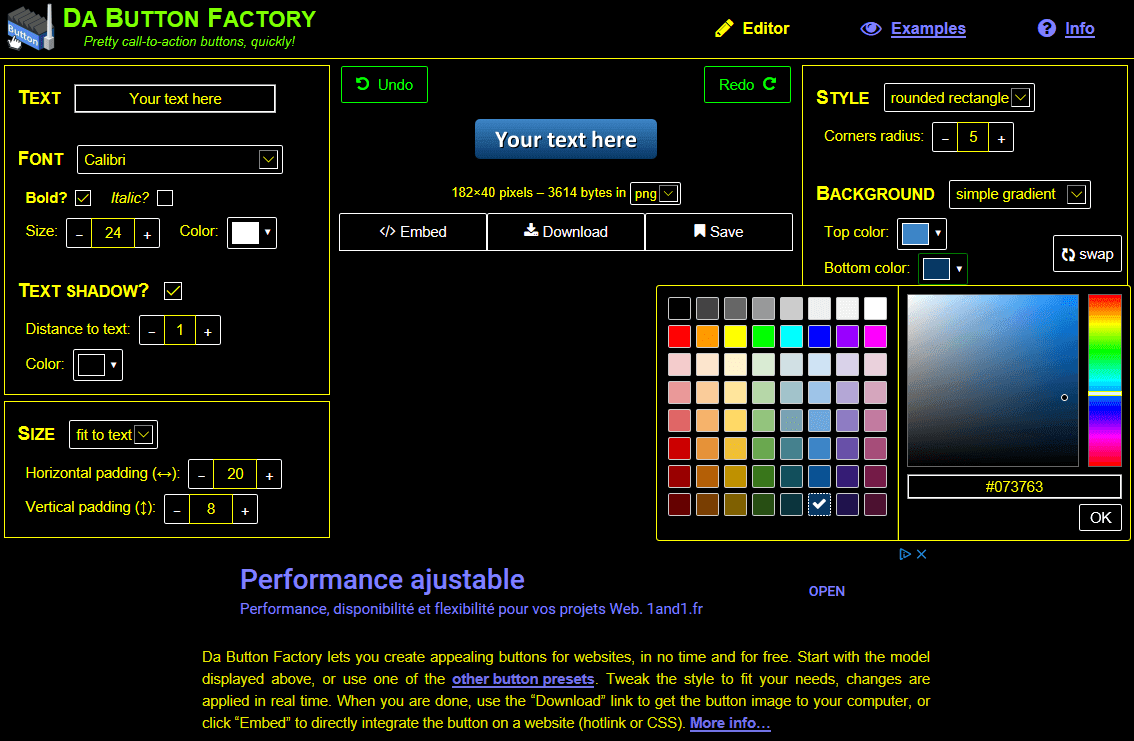
Much better. And it also looks good in High-Contrast white:

👍 for accessibility!
Tuesday, April 17, 2018
Da Button Factory now also available in french
Friday, December 29, 2017
2017 in retrospect
Improvements to Da Button Factory in 2017:
Web-based editor
- Undo/redo system was buggy. Rewrote it fully. Now works perfectly!
- Tested with NVDA (screen reader software) ⇒ fixed some accessibility issues
- On mobile: avoid page jumps, use bigger touch targets, optimize screen estate
- Some rewordings for clarity
- Faster initialization
API
- More lenient: font name now case-insensitive, autocorrect some client URL-encoding mistakes
- Documentation improved
Site
- HTTPS only
- Offline use / progressive web app: use a service worker
- Privacy policy
- More preset buttons
Friday, October 28, 2016
Downloaded buttons now named after the button text
When downloading a generated button image to your computer, its filename will now be based on the button text content, instead of always being the generic button.(png|jpg|gif|ico).
For instance, if the text is “Learn more”, the button filename will be button_learn-more.png. If the text is “Redeem your promotion code!”, the filename will be button_redeem-your-promotion-code.png.
This is especially useful when creating a batch of buttons that only differ in their text. With this new feature, the downloaded images have meaningful filenames that are easily differentiated.
There are some characters that are unsafe or inconvenient to use in a filename, especially if you intend to share the file (via email, etc.) with people using different operating systems.
So some transformations are applied to the button text to make it suitable as a filename. We chose to err on the side of safety at the cost of, sometimes, quite heavily modifying the text.
Spaces are replaced by hyphens, and things like punctuation marks get removed. Greek & cyrillic characters get transliterated to latin ones, and diacritics on latin characters are scrapped.
As a result, the filename will always only contain (a subset of the) ASCII characters. This also has advantages if the buttons are to be put on the web; their URLs won’t need any escaping.
The name is also all lowercase, mainly because some systems (notably, macOS) are case-insensitive.
Sadly this feature is not effective on all browsers, notably not in Internet Explorer and Safari.
It should however work in Safari 11, which is yet to be released at the time of this writing. As for Internet Explorer, its development has stopped and it has been replaced by a new browser, Microsoft Edge, since Windows 10. (This feature is effective on Edge.)
For instance, if the text is “Learn more”, the button filename will be button_learn-more.png. If the text is “Redeem your promotion code!”, the filename will be button_redeem-your-promotion-code.png.
This is especially useful when creating a batch of buttons that only differ in their text. With this new feature, the downloaded images have meaningful filenames that are easily differentiated.
Caveats
There are some characters that are unsafe or inconvenient to use in a filename, especially if you intend to share the file (via email, etc.) with people using different operating systems.
So some transformations are applied to the button text to make it suitable as a filename. We chose to err on the side of safety at the cost of, sometimes, quite heavily modifying the text.
Spaces are replaced by hyphens, and things like punctuation marks get removed. Greek & cyrillic characters get transliterated to latin ones, and diacritics on latin characters are scrapped.
As a result, the filename will always only contain (a subset of the) ASCII characters. This also has advantages if the buttons are to be put on the web; their URLs won’t need any escaping.
The name is also all lowercase, mainly because some systems (notably, macOS) are case-insensitive.
Browser compatibility
Sadly this feature is not effective on all browsers, notably not in Internet Explorer and Safari.
It should however work in Safari 11, which is yet to be released at the time of this writing. As for Internet Explorer, its development has stopped and it has been replaced by a new browser, Microsoft Edge, since Windows 10. (This feature is effective on Edge.)
Wednesday, April 13, 2016
Improved number & color input on mobile, IE ≤ 7 support dropped
Here are the main things coming from this spring round of improvements to Da Button Factory!


Better number and color input on mobile
When changing a size/distance field on a mobile, the keyboard now turns to “digits mode”:

And on a mobile system that support <input type="color"> (mainly relatively-recent Android, unfortunately not iOS), the native color picker is used, instead of the one used by default on Da Button Factory:

Since the default color picker was not designed for small & touch screens, it wasn’t very usable on mobile.
Dropping support for very old Internet Explorer versions
According to our stats, a negligible amount of visitors are using Internet Explorer ≤ 7. Completely dropping support for them means we could greatly reduce & clean the codebase. As a result, the vast majority of visitors will experience a faster and smoother experience, and mobile data plans will be spared.
Undo/Redo via keyboard shortcuts
It is now possible to undo or redo a change by using the usual keyboard shortcuts (for instance, CTRL-Z to undo on a PC keyboard). No need to reach for the mouse!
Wednesday, January 6, 2016
Quietly getting better everyday
Let’s review what changed on Da Button Factory in the past month:
Also, the FAQ page was totally broken when using keyboard navigation (no way to expand the answers): this is now fixed.
Some minor global layout/style changes on the mobile site were also done.
With all that said, let us wish you a happy new year!
Better keyboard handling
Lots of modifications were made to make navigating using the keyboard much smoother.
The biggest thing is that now, all the relevant items on the button designer are focusable and activable with the keyboard. Previously, the color fields were not.Also, the FAQ page was totally broken when using keyboard navigation (no way to expand the answers): this is now fixed.
Improved mobile support
Mainly, the editor now detects when the virtual (aka “soft”) keyboard on a mobile is visible, and adjusts the layout consequently: the button preview area gets smaller (to avoid covering the edited text field).
Also the keyboard does no more automatically (and stupidly, as these fields are read only!) appeared when the button or editor URL is revealed when clicking on the “Export” or “Save” button, or when using the undo/redo buttons are used.Some minor global layout/style changes on the mobile site were also done.
Loading is faster than ever
While Da Button Factory was already fast, the initialization phase of the button maker got even faster. This should be hardly noticeable on a recent desktop computer (we are talking tenths of milliseconds here), but this has a visible, although small, impact on mobiles or old computers.
Smarter layout on wide desktop screens
Assuming a modern web browser (one that supports flexbox) and a wide screen (width ≥ 1340 px), the main content on the site pages will now expand to make better use of the available space.
Improved support of old browsers
The site experience was reviewed on old browsers and consequently improved, especially for old versions (< 10) of Microsoft Internet Explorer.
With all that said, let us wish you a happy new year!
Monday, November 23, 2015
Cleaner button CSS code
When generating the CSS3 code for a button, support of the background gradient syntax(es) used by very old web browsers (that now have an insignificant market share) has been dropped. This result in less and cleaner code, and there is still the universal fallback to a plain solid color anyway.
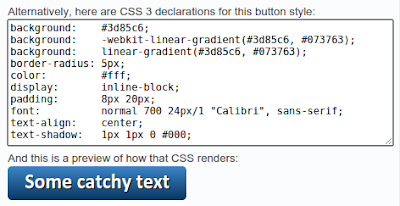
This change was inspired by “PSA: don’t use gradient generators”.

This change was inspired by “PSA: don’t use gradient generators”.
Saturday, October 24, 2015
Another server, new presets
Since the beginning, Da Button Factory had been running on a single server. While there was no problem keeping up with the load, this situation was not so great regarding availability: if the server had an issue, dabuttonfactory.com could experience downtime; there was no redundancy.
To alleviate that risk, we have been testing serving dabuttonfactory.com using two computers, the original one located in France and a new server in north America.
So far so good after a few weeks of trial, so we made the switch today to fully run on this dual server, redundant architecture.
As a side-effect of this, our american users will experience reduced latency and higher speed. Our capacity also doubled; as a result, we raised some API limits :-)

To alleviate that risk, we have been testing serving dabuttonfactory.com using two computers, the original one located in France and a new server in north America.
So far so good after a few weeks of trial, so we made the switch today to fully run on this dual server, redundant architecture.
As a side-effect of this, our american users will experience reduced latency and higher speed. Our capacity also doubled; as a result, we raised some API limits :-)
And to celebrate all this, we added three button presents on the Examples page:

Hope you like them!
Saturday, October 17, 2015
Video tutorials
I found out that Eduardo Amorim just made a YouTube video presenting Da Button Factory, in portuguese. Thanks to him!
This nicely complements the english-speaking Da Button Factory video tutorial made by Bob Chambers. This one is linked from the Info page, and although it presents an older version of the button generator, it is still quite accurate as the button maker works globally the same nowadays.
And in case you didn’t know it, there is also a short soundless video showing how to embed a button on Wordpress (also linked from the Info page, in the “How do I embed a button on my website and make it clickable?” section).
This nicely complements the english-speaking Da Button Factory video tutorial made by Bob Chambers. This one is linked from the Info page, and although it presents an older version of the button generator, it is still quite accurate as the button maker works globally the same nowadays.
And in case you didn’t know it, there is also a short soundless video showing how to embed a button on Wordpress (also linked from the Info page, in the “How do I embed a button on my website and make it clickable?” section).
Tuesday, July 21, 2015
Da Button Factory available as a Chrome webapp
Da Button Factory is now available on the Chrome Web Store, for free.
Installing it means getting an easy way to launch Da Button Factory from the “Applications” page of Google Chrome/Chromium:

There also was a bunch of small improvements to Da Button Factory in the last weeks, especially regarding the usability of the site on a smartphone/tablet, and in the documentation. The look of the site was also a bit stripped down, to make it even cleaner and fast-loading.
Installing it means getting an easy way to launch Da Button Factory from the “Applications” page of Google Chrome/Chromium:

It also means that our faithful users can now rate and comment on the app to give us feedback, and improve awareness about the site.
Sunday, February 8, 2015
Mobile friendly, better fonts, CSS3 button export
Big update on Da Button Factory this week-end!
Our online button generator is now mobile-compliant. Previously the rendering & usability on non-PC devices was horrible. But from now, the button editor works well on smartphones and tablets:

The list of available fonts has been revamped. A bunch were added, some were “removed”. What that means is that some of the older fonts are no more displayed by default in the “Font” drop-down list. But if you saved/bookmarked the URL of an editing workspace that used one of these old fonts, they will appear again. We are backward-compatible on that.
We wanted to carefully pick a good selection of fonts, that offers variety in style and works well for different use-cases, but without having an overwhelming choice (less is more). That is why some of the old fonts got removed; they were statistically the least used, and/or the most problematic (only display well for a narrow range of text sizes, not pretty in the bold/italic variants, etc.)
Also, the fonts are now categorized by “family” (sans-serif, serif, fantasy/cursive): this should help in exploring them.
The button maker now outputs CSS 3 code instead of the out-of-date CSS declarations that were previously generated. Browsers change quite a lot since 2009 but we did not touch the CSS generation since then. This is now corrected!
An old, apparently unnoticed, bug in the padding handling was discovered and corrected. Previously the button text could be wrongly cropped if it contained characters that go under the baseline (j, p, q, etc.) and if the vertical padding was too small:

Our online button generator is now mobile-compliant. Previously the rendering & usability on non-PC devices was horrible. But from now, the button editor works well on smartphones and tablets:
We wanted to carefully pick a good selection of fonts, that offers variety in style and works well for different use-cases, but without having an overwhelming choice (less is more). That is why some of the old fonts got removed; they were statistically the least used, and/or the most problematic (only display well for a narrow range of text sizes, not pretty in the bold/italic variants, etc.)
Also, the fonts are now categorized by “family” (sans-serif, serif, fantasy/cursive): this should help in exploring them.
The button maker now outputs CSS 3 code instead of the out-of-date CSS declarations that were previously generated. Browsers change quite a lot since 2009 but we did not touch the CSS generation since then. This is now corrected!
An old, apparently unnoticed, bug in the padding handling was discovered and corrected. Previously the button text could be wrongly cropped if it contained characters that go under the baseline (j, p, q, etc.) and if the vertical padding was too small:
Now it works without problem. But to correct this bug, the handling of paddings has to completely changed, and a button with a vertical padding of, say, 10px, in the new version will appear significatively taller than in the old version. We do not break backward-compatibility for previously generated button images that are hotlinked somewhere on the web: they will display as previously. But if you saved a button workspace and access it again, the padding will have visibly changed. No big deal though, just reduce it and the button will render as previously.
That’s all for the big things. Minor things include:
- the editor look was refreshed. A new color picker, easier-to-use, is now in place.
- the example buttons changed
- the navigation changed; a new “Info” page is now present, API & Contact are less prominent
Friday, January 16, 2015
Faster load, better API doc, and some other small things
Some small improvements over the past two days to Da Button Factory:
- a bug in the undo/redo system was fixed, where the color fields were not properly reset to the right color
- the online button creator is now faster to load, thanks to a few tricks (fewer external javascript files to download, reduced CSS code, …)
- the API documentation has been updated & improved
- the Contact page now has a “Frequently Asked Question” section. Among other things, it says explicitely what the generated buttons license is: free to use and embed without restriction!
- and some other minor things :-)
Tuesday, October 8, 2013
A new tool to create buttons
As some of you might have noticed, Da Button Factory has not been updated for a long time now. Although I don’t plan on closing it, I’m glad to inform you that I recently released a new online button maker at https://www.imagefu.com/create/button.
This new editor supports, among other things, multi-lines text and color transparency, which were the most requested features for Da Button Factory.
Imagefu aims at providing several fast-and-simple editors for different type of graphics, not only buttons. There is also a badge creator available at the moment.
I hope that you like this new tool! If you have some spare time, feedback and suggestions are welcome in the comments section of this post, on Twitter or by email.
This new editor supports, among other things, multi-lines text and color transparency, which were the most requested features for Da Button Factory.
Imagefu aims at providing several fast-and-simple editors for different type of graphics, not only buttons. There is also a badge creator available at the moment.
I hope that you like this new tool! If you have some spare time, feedback and suggestions are welcome in the comments section of this post, on Twitter or by email.
Thursday, January 7, 2010
A new font and a few more examples
A new font is available: Candela. It's a clean, modern sans-serif font. Here what it looks like in its italic variant:


Also, some new examples are now in the examples gallery. The one I preferred is, I think, the Twitter-like Sign Up button:
Wednesday, December 23, 2009
Da Button Factory updated
I have been quite busy professionnaly since the last update, but I've found some time these days to upgrade Da Button Factory.
The site seems to not have changed a lot, it's because my time was mostly used to completely changed the back-end infrastructure of the site to prepare for some more heavy visible changes (as listed, for example, in the previous post).
Anyway, this upgrade features:
- a new design: a bit more polished and uncluttered. This new design uses CSS 3 features and is best seen with a recent decent browser, like Firefox, Safari or Google Chrome. There are still rendering problems with Internet Explorer, I am working on fixing them. The new color picker is far more powerful and good-looking.
- a faster site: the overall size of the pages has been reduced, the editor is more reactive, buttons that has already been generated are cached and served from RAM directly by the webserver, gzip compression has been activated, the site uses less images, etc.
- less interface bugs: the color picker, for instance, was known to not work correctly on Internet Explorer 8. That, and a lot of other little issues, is now fixed.
- a new image output format: ico. This is the format used for the favicons, and some people seem to use Da Button Factory to create some. So now you can directly generate one with Da Button Factory, without having to manually convert it from png to ico. A favicon example can be edited here (it's the one used for dabuttonfactory.com).
- the image size (in bytes) is now displayed.
- the API is now more documented.
Let me know what you think about the new design or anything, or if you found any bug. Oh, and Merry Christmas :-)!
Saturday, April 4, 2009
Announcement: new version in preparation
Hello everyone out there following Da Button Factory! Some news.
1. the "Da Button Factory" Flickr account has apparently been deleted (see the previous post talking about the Flickr experiment).
Well, I can understand that they (the Flickr admins) saw it as a form of spam (every uploaded button had an hyper-link to edit it in DaBuFa in its description field...). But this is a pity, for spamming was of course not the intention.
Anyway, I keep the user-generated gallery idea in my head, and it will come back. But this is delayed for now because...
2. Da Button Factory is going to be heavily changed and improved. I have started to work on a new version which should feature:
These are big new things to integrate, so it will certainly take some time before I can present something, a beta version of this new version. But please be patient and don't worry if you don't see new blog posts for a while: it's because I will work so hard I will have no time to write :-)!
And please, please, please, if you have any suggestion for this new version, or for anything else: leave a comment, or email me!
I am always glad to get feedback from anyone using Da Button Factory, or even from people which don't use it (if so, tell me why! :-)) And I always listen and think of suggestions very carefully, and try hard to integrate them in a way or another. And of course, I always answer emails :-)
1. the "Da Button Factory" Flickr account has apparently been deleted (see the previous post talking about the Flickr experiment).
Well, I can understand that they (the Flickr admins) saw it as a form of spam (every uploaded button had an hyper-link to edit it in DaBuFa in its description field...). But this is a pity, for spamming was of course not the intention.
Anyway, I keep the user-generated gallery idea in my head, and it will come back. But this is delayed for now because...
2. Da Button Factory is going to be heavily changed and improved. I have started to work on a new version which should feature:
- an easy generation of an hover and/or active states for the button
- more output formats, mainly a "CSS sprites" one.
- button themes. Think of them as the current "examples" page but in more powerful: you'll be able to dynamically change the theme of your button. You will be able to save your own themes. You will be able to generate a random theme, etc.
- more generally, there will certainly be the introduction of registered accounts so that people can upload their own fonts, save their themes, etc.
These are big new things to integrate, so it will certainly take some time before I can present something, a beta version of this new version. But please be patient and don't worry if you don't see new blog posts for a while: it's because I will work so hard I will have no time to write :-)!
And please, please, please, if you have any suggestion for this new version, or for anything else: leave a comment, or email me!
I am always glad to get feedback from anyone using Da Button Factory, or even from people which don't use it (if so, tell me why! :-)) And I always listen and think of suggestions very carefully, and try hard to integrate them in a way or another. And of course, I always answer emails :-)
Tuesday, March 31, 2009
Today update: CJK support, Flickr experiment
Da Button Factory now includes a font, Zenhei, which supports the CJK (Chinese - Japanese - Korean) characters.
I hope our asian friends will have a better experience!

Try this new font!
Also, this update introduce a kind of experiment. At some interval, the button currently generated by the factory is chosen to be uploaded to Flickr, a well-known photo-sharing service.

Take a look at the user-generated button gallery!
The idea is to create a big collection of user-generated buttons that you can freely browse.
And when you find a button that pleases you, you can directly edit it in Da Button Factory by clicking the hyper-link present in its description field.
As I said, it is an experimentation. I don't really know what will result from it. But as I see it, it would become a huge gallery of very different (and very pretty :-)) examples. I hope the wisdom of crowds will apply here, and that using the imagination of plenty of people will be a right thing. Time will tell!
Finally, there is also a minor UI improvement: a "copy" button now sits next to the button/workspace URL, to copy its value in the clipboard.
It might not work in every browser, but at least it always selects the text (then just do CTRL-C or Command-C on a Mac).
The workspace URL also have an "open" link to open the current workspace configuration in a new window. Mainly useful if the "bookmark" button doesn't work with your browser.
I hope our asian friends will have a better experience!
Try this new font!
Also, this update introduce a kind of experiment. At some interval, the button currently generated by the factory is chosen to be uploaded to Flickr, a well-known photo-sharing service.
Take a look at the user-generated button gallery!
The idea is to create a big collection of user-generated buttons that you can freely browse.
And when you find a button that pleases you, you can directly edit it in Da Button Factory by clicking the hyper-link present in its description field.
As I said, it is an experimentation. I don't really know what will result from it. But as I see it, it would become a huge gallery of very different (and very pretty :-)) examples. I hope the wisdom of crowds will apply here, and that using the imagination of plenty of people will be a right thing. Time will tell!
Finally, there is also a minor UI improvement: a "copy" button now sits next to the button/workspace URL, to copy its value in the clipboard.
It might not work in every browser, but at least it always selects the text (then just do CTRL-C or Command-C on a Mac).
The workspace URL also have an "open" link to open the current workspace configuration in a new window. Mainly useful if the "bookmark" button doesn't work with your browser.
Subscribe to:
Posts (Atom)

